


Intellifi by Adtran®
4.219.00 Reviews
App Specs
- Version
- 6.29.0
- Updated On
- License
- Free
- Downloads
- 10,000+
- Developer
- ADTRAN Holdings, Inc.
- Categories
- House & Home
- Platform
- Android
Screenshots
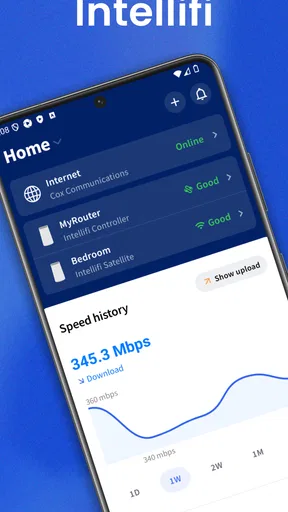
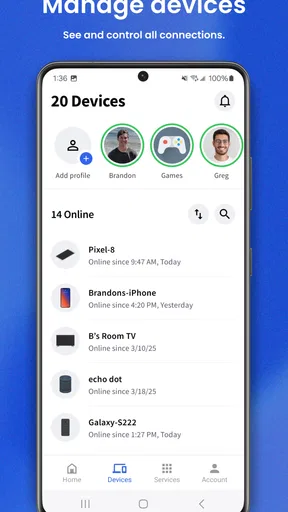
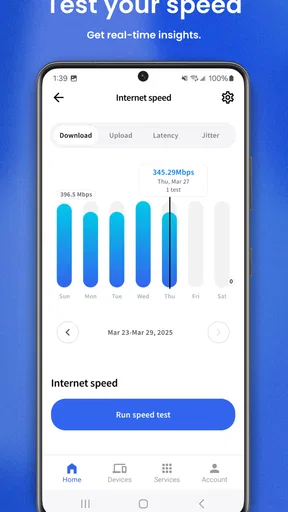
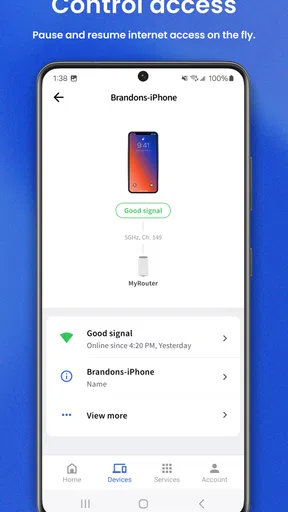
 Analysis by AppCompare
I look at home Wi-Fi a little differently after using Intellifi: not as a box hidden in a corner, but as a service that needs occasional attention. This free House & Home app from ADTRAN Holdings, Inc. is designed to make that attention easier from a phone. Its purpose is straightforward—helping you understand and manage the Wi-Fi network supplied through compatible Adtran equipment—yet the value depends heavily on how much control your particular home setup exposes.
My overall impression is that it works best as a practical network companion rather than a replacement for a full router administration tool. It can give everyday users a friendlier place to check their connection and connected home, while avoiding the intimidating menus found in many traditional router interfaces. At the same time, anyone expecting advanced network engineering controls, broad hardware compatibility, or a complete smart-home command center should keep expectations measured.
How Intellifi fits into everyday home Wi-Fi
The app’s current identity is clear. It is a mobile assistant for a home Wi-Fi network, aimed at people who want useful visibility without opening a browser, finding an administration address, and working through technical terminology. That makes it particularly appealing when the person paying for the internet is not the person who installed the router.
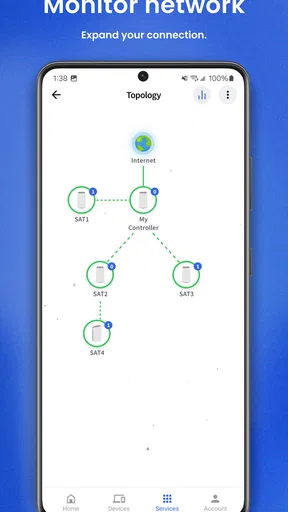
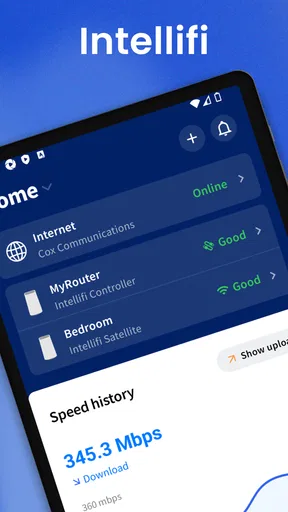
I can imagine using it in a very ordinary situation: a video call begins stuttering, a television stops loading a streaming service, or a child says the connection feels slow. Instead of immediately unplugging the router, I would open the app, look at the state of the home network, and check whether an unfamiliar device is connected or whether the problem appears to affect the whole household. That first look does not solve every fault, but it gives the troubleshooting process a sensible starting point.
The app is available at no cost and carries an Everyone content rating, so it is positioned as a household utility rather than a specialist tool for adults. It runs on Android devices using version 7.0 or later. That broad operating-system support is useful for families who keep older phones around, although the experience can still vary depending on the Adtran equipment and service arrangement behind the app.
One detail I would not overlook is the relationship between the app and the network hardware. Intellifi is not simply a generic Wi-Fi scanner that can take over any router. Its usefulness is tied to compatible Adtran-managed environments. If your internet provider supplied equipment that works with it, the app may become a convenient front door to your network. If you use a router from an unrelated manufacturer, installing it is unlikely to transform that setup into an Intellifi-managed system.
A calmer alternative to router administration pages
Traditional router dashboards often assume that the user understands terms such as wireless bands, local addresses, security modes, and channel settings. That flexibility is valuable for enthusiasts, but it can make a simple question—“What is connected right now?”—feel unnecessarily complicated. Intellifi’s appeal is the attempt to translate network status into a mobile experience that is easier to approach.
Worth Reading Before You Choose

Flipboard Shows What News Apps Must Do Beyond the Feed

Switching to Android Auto Means Rethinking Your Driving Routine

Google Calendar Makes a Crowded Week Easier to Manage

Ludo King Makes the Most of the Minutes Between Plans

Baby Panda World Brings Quick Play to Modern Phones, but Its Game Library Feels Busy

ESPN’s Live Game View Makes Following Close Games Easier
That difference matters most during troubleshooting. A browser-based control panel is usually designed around configuration, while a phone app is better suited to quick checks while walking around the house. I prefer being able to investigate from the sofa or next to the device having trouble, rather than opening a laptop and navigating a dense settings page.
There is a trade-off, though. A simpler interface can hide the detail that experienced users want. If you need precise wireless tuning, extensive diagnostic logs, or control over every advanced router parameter, a manufacturer’s full web interface may remain the better option. Intellifi makes the first layer of network care more approachable, but it should not be mistaken for a universal replacement for deeper administration tools.
What the current release tells me
The current version is 6.29.0, which suggests an established application rather than a newly assembled companion with only a basic setup screen. I would read that as a sign of ongoing product development, but not as proof that every desired feature is present. A version number by itself cannot tell me how much has changed internally, so I judge the app by how well its present workflow supports real household decisions.
The app was released on May 31, 2023, and its audience has had time to form an opinion. It holds a 4.2 average from around 144 ratings, with 19 written reviews, and has passed 10K+ installs. Those figures point to a modest but real user base. They are encouraging enough to show that the concept is useful to many people, while also reminding me that this is a focused companion for a particular network ecosystem rather than a mass-market tool used by every router owner.
For existing users, the practical question is less about the version number and more about continuity. A current release can make the app feel like an actively maintained part of the service, but the day-to-day benefit comes from whether it still recognizes the home setup, presents connected devices clearly, and lets the user reach important actions without friction. I would update it normally, then spend a few minutes checking that the network overview and device information still appear as expected.
Useful habits that make the app more valuable
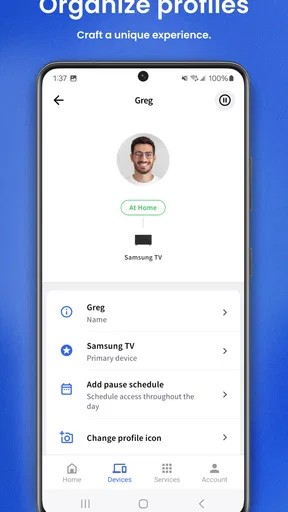
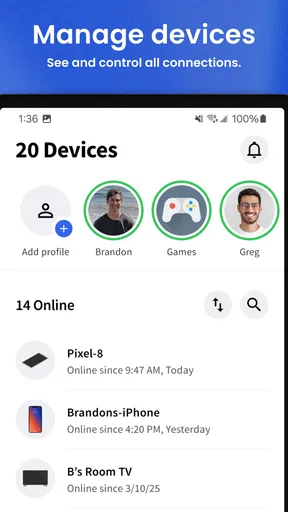
My first recommendation is to treat the initial device list as a household inventory, not merely a screen to glance at once. Many homes contain repeated or vague device names: phones, speakers, televisions, cameras, printers, and appliances can be difficult to distinguish later. If Intellifi allows you to identify or organize devices in your setup, doing that early turns a confusing list into a useful reference. The benefit appears later, when an unfamiliar entry deserves attention.
A second good habit is to check the app before blaming the internet provider. If several unrelated devices are affected at the same time, the problem may be at the network or service level. If only one phone or television is struggling, the issue may be local to that device, its distance from the access point, or its own software. This simple comparison prevents a common mistake: restarting everything before finding out whether the fault is actually widespread.
A third insight is to use the app as a communication tool within the household. When someone asks why a device is not online, a shared network view can replace guesswork. That is especially useful in homes where one person handles the router and everyone else depends on it. The app does not need to make the user a networking expert to improve the conversation; it only needs to make the current state easier to describe.
I would also check the network after adding a new connected product. Smart televisions, speakers, plugs, and appliances can appear at different times and under names that are not immediately obvious. Looking soon after installation helps establish which entry belongs to the new device. This is a small workflow, but it is more useful than waiting until a crowded device list becomes difficult to interpret.
Where it helps different kinds of households
Intellifi is a strong fit for a household that wants reassurance rather than constant configuration. Parents can use a network overview when a child’s device suddenly disappears from Wi-Fi. Someone working from home can check whether the issue appears limited to one machine before restarting a meeting setup. Older family members may appreciate a phone-based interface more than a technical router page, provided the underlying Adtran service is compatible.
It can also help people who move around the home while troubleshooting. A connection that works in one room but behaves poorly in another raises questions about placement and coverage. The app cannot physically improve a weak signal by itself, but it can help separate a general outage from a location-specific problem. That distinction matters before spending money on a new router or additional networking equipment.
I would be more cautious recommending it to a network enthusiast who wants granular control. The attraction of a specialist router interface is precisely the amount of information and adjustment it exposes. Intellifi’s friendlier approach may feel restrictive if your goal is to tune every wireless setting, inspect detailed technical behavior, or build a highly customized network. In that case, the tools supplied by your router manufacturer—or a dedicated diagnostic utility—may be a better match.
It is also not the right choice for someone looking for a general smart-home platform. The app’s center of gravity is home connectivity. A network assistant can help a smart device stay connected, but that does not make it a universal controller for lighting, automation routines, entertainment, or appliance ecosystems. I would choose it for Wi-Fi visibility, not because I expect it to replace every other home app.
Friction points I would consider before relying on it
The biggest limitation is compatibility. The app’s usefulness depends on the relationship between Intellifi, Adtran-supported equipment, and the service connected to that equipment. This is important for people who are considering a new router or changing internet providers. A polished mobile interface cannot compensate for an unsupported network environment, so I would verify that the home setup belongs to the intended ecosystem before building my routine around the app.
Another limitation is that an overview does not automatically explain the cause of a problem. Seeing a device connected does not guarantee that its application, signal quality, or internet path is healthy. Likewise, seeing a device absent does not immediately reveal whether it is powered off, asleep, out of range, or experiencing a fault of its own. I see the app as a way to narrow the possibilities, not as an automatic technician.
There can also be a learning curve in naming household devices. Even a well-designed list becomes less useful when several entries look alike. I would invest time in making the list understandable, but that effort is part of the ownership experience. People who want completely automatic identification may find the process less satisfying than expected.
Finally, an app-based approach introduces a dependence on the phone and on the app’s connection to the home service. A physical router indicator or a browser interface can sometimes remain useful when a mobile workflow is inconvenient. For that reason, I would keep basic troubleshooting habits—checking power, cables, and the affected device—alongside the app rather than treating it as the sole source of truth.
How it compares with the usual alternatives
Compared with a standard internet-provider app, Intellifi’s value is likely to be most apparent when the focus is the local Wi-Fi experience inside the home. Provider apps often emphasize billing, service status, account management, or broad outage information. A network-focused companion is more relevant when the question is which household device is connected and whether the home setup itself appears normal.
Compared with a router manufacturer’s advanced dashboard, Intellifi favors accessibility over depth. The manufacturer’s interface may expose more technical controls and diagnostic information, while Intellifi is better suited to quick checks by ordinary household members. I would choose between them according to the task: use the simpler mobile view for routine awareness, and keep the deeper interface available when a configuration problem requires it.
Compared with standalone Wi-Fi analyzer apps, Intellifi is not primarily about surveying nearby wireless networks or presenting technical radio measurements. Analyzer tools can be useful when investigating interference or planning access-point placement, but they often overwhelm casual users. Intellifi makes more sense when the goal is managing the home network connected to the supported Adtran environment, not performing a detailed wireless engineering survey.
That comparison also explains why there is no single winner. A family may benefit from Intellifi for everyday visibility, while a technically minded household keeps the router dashboard and an analyzer tool for occasional deeper work. I would not replace every networking utility with it, but I would value having a less intimidating first step.
What existing users should watch as the app evolves
For people already using the app, I would watch how future releases handle continuity across changing home setups. Network equipment gets replaced, households add devices, and service arrangements change. A useful companion should make those transitions understandable rather than leaving the user wondering whether a missing device reflects a fault, a new configuration, or a changed account relationship.
I would also pay attention to whether later updates improve the difference between “connected” and “working.” That distinction is central to troubleshooting. A device can have a Wi-Fi link while still failing to reach an online service, and a good network assistant becomes more valuable when it helps users understand that boundary without burying them in technical detail.
Privacy and clarity are worth watching as well. Whenever a mobile app presents a household device list, users benefit from knowing what they are seeing and why. Clear labels, understandable status messages, and predictable account behavior matter more to me than decorative design. They determine whether I trust the app during a stressful outage.
The current release gives Intellifi a credible place in an Adtran-connected home, but I would judge its long-term value by practical refinement rather than by new features alone. Faster access to the right information, clearer explanations, and smoother handling of ordinary household changes would do more for me than a growing collection of controls that most users never touch.
My recommendation for the right user
I recommend Intellifi to anyone using a compatible Adtran home network who wants a simpler way to understand what is happening with Wi-Fi. Its free access, Everyone rating, broad Android support from version 7.0 onward, and focused purpose make it easy to try. The strongest use is not dramatic network rescue; it is the steady reduction of guesswork when a device misbehaves or a household member needs a quick answer.
I would skip it if your router is outside the supported Adtran environment, if you need advanced wireless controls, or if what you really want is a full smart-home command center. In those cases, the provider’s own tools, the router’s detailed administration interface, or a specialized analyzer may serve you better.
My final view is positive but practical. Intellifi does not need to turn every user into a network expert to be worthwhile. It succeeds when it gives an ordinary household a clearer first look at its Wi-Fi and helps people troubleshoot in a more orderly way. Use it as a friendly network assistant, not as a promise that every connection problem will explain itself. That expectation matches its role and is where I think the app delivers the most value.
Pros
- Provides centralized control for compatible smart-home devices.
- Supports remote monitoring and management through a mobile app.
- Can simplify Wi-Fi and connected-device troubleshooting.
- Designed to work with ADTRAN smart-home network equipment.
- May help improve visibility into household network activity.
Cons
- Requires compatible ADTRAN equipment to access its main features.
- Some functions may vary depending on the installed hardware and service plan.
- Initial setup can be confusing for users unfamiliar with network devices.
- Performance depends on the quality of the home internet connection.
- Limited usefulness if your home uses devices outside the supported ecosystem.
FAQs for Intellifi by Adtran®
What is Intellifi by Adtran® used for?
Intellifi by Adtran® is designed to help users manage and monitor compatible home Wi‑Fi networks. Depending on the service provided by your internet provider, the app may let you view connected devices, check network performance, manage access, configure guest Wi‑Fi, and receive notifications about connectivity. Available tools can vary according to your subscription, router model, and provider settings.
Is Intellifi by Adtran® compatible with every Wi‑Fi router?
No. Intellifi by Adtran® is generally intended for customers using compatible ADTRAN equipment or an internet service provider that supports the platform. Installing the app does not guarantee that it will work with an unrelated router or broadband service. Before downloading, check your provider’s website or customer support information to confirm device compatibility and whether your account has access to the app.
What permissions and account information does the app require?
The app may request permissions needed to identify and manage your home network, such as local network access, notifications, and device information. You will typically need to sign in using credentials supplied by your internet provider or create an account connected to your broadband service. Permission availability can differ between Android and iOS, so review the prompts carefully and allow only access required for the features you intend to use.
Can Intellifi by Adtran® improve my internet speed or fix all connection problems?
Intellifi by Adtran® can provide useful diagnostics, network information, and management controls, but it cannot overcome every technical limitation. Actual speed depends on your broadband plan, router, Wi‑Fi interference, home layout, and connected devices. The app may help identify weak coverage or connectivity issues and guide troubleshooting, although some faults require contacting your internet provider or replacing network equipment.
Is Intellifi by Adtran® free to download and use?
The application may be available to download without an upfront charge, but access to its features is usually linked to a participating internet provider and an eligible service plan. It should not be assumed that downloading the app creates a standalone Wi‑Fi service or removes subscription costs. Check your provider’s terms for activation requirements, supported equipment, data usage, and any charges associated with your broadband plan.


